The Evolution of Personal Information Management Software
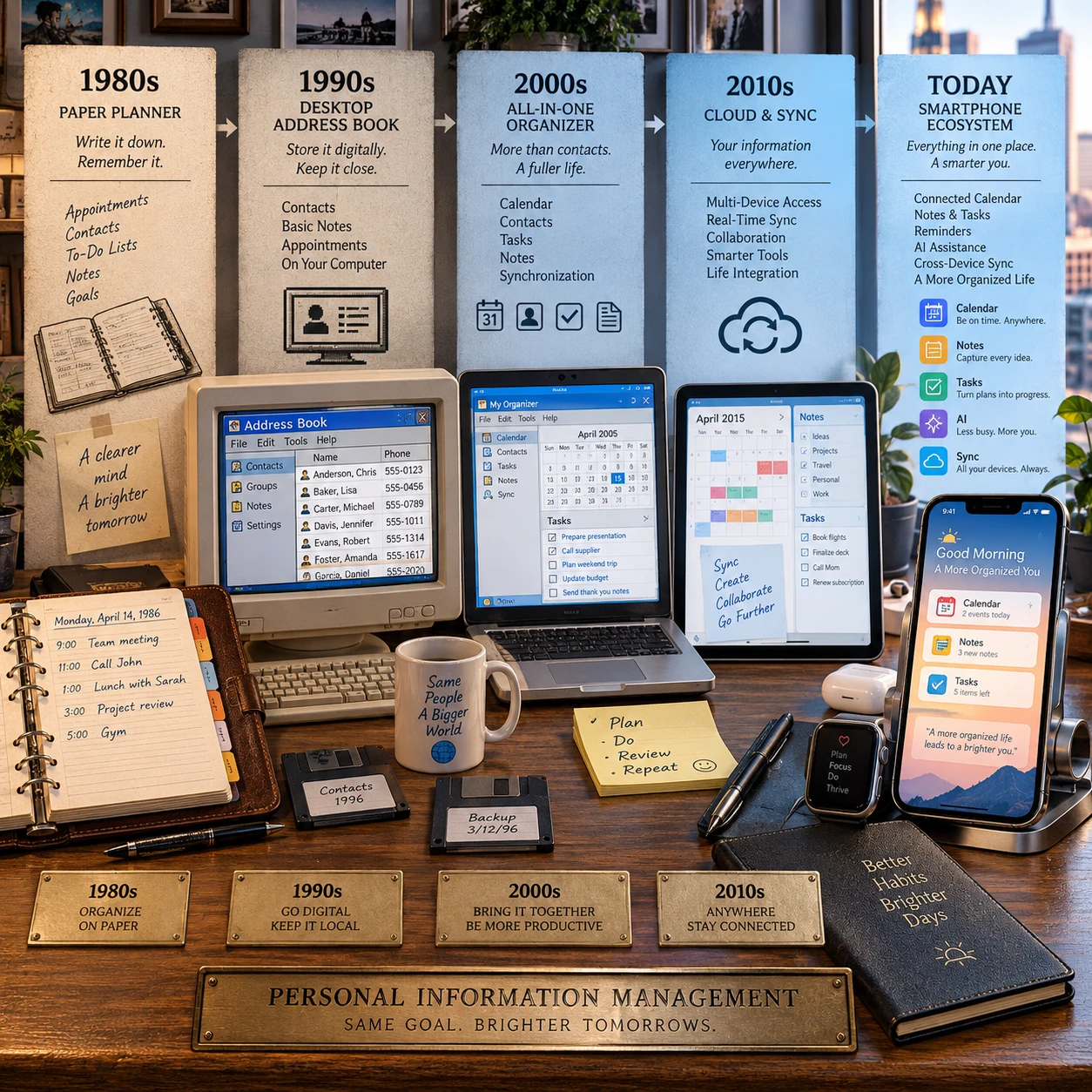
Personal information management software has changed alongside the way people work, communicate, and carry information. Early desktop programs put calendars, contacts, and task lists on a computer; today, cloud services and mobile apps make those details available across devices, often with automation and artificial intelligence in the mix.
The shift is about more than new features. Each generation of personal information management (PIM) tools responds to a practical need: keeping useful information organized and accessible without making it harder to manage.
What Personal Information Management Software Does
Personal information management software helps people collect, organize, find, and use information related to their everyday lives. It commonly includes digital calendars, contact management, task lists, and note-taking applications, either as separate tools or as parts of a broader workspace.
PIM describes both a set of activities and the software that supports them. A calendar records appointments; a contact manager keeps names and communication details; a notes app captures ideas and reference material. Task managers track actions. Together, these tools help answer four basic questions: What do I know? Where did I put it? What needs attention? When does it matter?
The category has fuzzy edges. A dedicated task manager may be PIM software for someone who uses it to manage personal commitments, while a company database usually serves a different purpose. What matters is whether a tool helps an individual manage their own information and responsibilities.
Good PIM software reduces the effort needed to maintain that system. But putting everything into one app is not automatically better. A highly integrated suite can simplify searching, while separate specialist tools may offer clearer workflows or more control over where information is stored.
Early PIM Tools and the Desktop Era
Early desktop PIM tools brought everyday organization from paper into computer software. Digital calendars, address books, and task managers let users store and edit personal records on a home or work computer.
In the desktop era, the personal computer became a central filing cabinet for practical information. Users could enter appointments, look up a phone number, maintain a list of tasks, or save notes without rewriting everything by hand. Desktop productivity software also made it easier to search, sort, and update records.
These programs were shaped by the limits of their setting. Information usually lived on one machine or in a particular account, so access depended on being at that computer. People often relied on local files, manual backups, or synchronization processes that required extra steps. Sharing details with another person could mean exporting a file or copying information into a message.
Still, desktop PIM established a durable design idea: personal information is more useful when related items can be stored in consistent, searchable formats. Its trade-off was clear. Users gained a structured digital system, but they also took responsibility for maintaining the files and keeping copies safe.
The Shift to Connected and Cloud-Based Tools
Cloud-based PIM tools store or update information through internet-connected services, making it easier to reach the same calendar, contacts, or notes from more than one device. Cloud synchronization changed personal organization from a computer-centered activity into a connected one.
As internet access became a routine part of computing, PIM services could keep information in sync between a desktop, laptop, and other devices. A calendar change made in one place could appear elsewhere; a contact updated online did not have to be re-entered on every computer. Sharing calendars and lists also became more practical, especially for households and teams coordinating schedules.
This model introduced a new dependency. Access may rely on an internet connection, a service provider, and account security. Offline features vary, and a service outage or account problem can temporarily make information harder to reach. Cloud convenience also raises questions about who can access stored data, how it is protected, and whether it can be exported in a usable format.
A sensible way to assess a cloud PIM tool is to check three things: whether it works offline for essential tasks, whether it supports reliable export or backup, and what privacy controls it offers. Synchronization saves repetitive work, but it does not remove the need for a recovery plan.
Mobile Devices Transform Personal Organization
Mobile apps made PIM tools available at the moment people need them, rather than only when they sit at a computer. Smartphones put calendars, contacts, reminders, and note-taking applications in a pocket and linked them to daily routines.
Portability changed how information gets captured. Someone can add a reminder after a conversation, check an address while traveling, or record an idea before it slips away. Notifications bring upcoming commitments into view, while cameras, voice input, location features, and mobile keyboards give people several ways to add context.
Mobile access works best when it reduces friction. If creating a note takes too many taps or reminders arrive too often, users may stop trusting the system. Small screens also make detailed editing less comfortable than on a desktop, and frequent alerts can compete for attention. A useful setup reserves notifications for time-sensitive actions and keeps reference material easy to search without interrupting the day.
Phones also made integration more visible. A contact can connect to a call or message, and an appointment can link to a location or video meeting. That context saves steps, though it can blur boundaries between personal and work information. Separate accounts or calendars can help keep those boundaries clear.
Modern PIM: Integration, Automation, and AI
Modern PIM software increasingly connects information across apps and automates routine organization. Cross-platform integration can link calendars, tasks, contacts, email, and notes, while artificial intelligence may help summarize, search, or categorize information.
Integration reduces the need to re-enter details. For example, a meeting invitation can appear in a calendar, while a task app may connect an action to its due date. Some tools can turn a message into a reminder or make information searchable across several services. The benefit depends on the quality of those connections: a broken or one-way sync can create duplicates or leave records out of date.
Automation and AI add another layer. Depending on the product, AI features may summarize notes, suggest categories, or help retrieve a detail using a natural-language query. These capabilities can save time when the result is easy to verify. They are less dependable when context is ambiguous, and sensitive information deserves particular care before it is sent to an AI service.
When evaluating a modern PIM system, think in terms of a capture–connect–control test. Can you capture information quickly? Can the tool connect relevant items without creating clutter? Can you control access, correct mistakes, and export your data? This simple check weighs convenience against reliability and privacy.
What the Evolution Means for Users and What Comes Next
The evolution of PIM software gives users more ways to access and connect personal information, but it also makes privacy, interoperability, and control more important. The most useful system is one that fits a person’s habits and remains dependable when technology or routines change.
Future PIM tools will likely continue exploring AI assistance, automation, and cross-platform integration. Those features can make information easier to locate, but their value depends on accuracy, transparent permissions, and clear ways to correct or undo automated changes. Convenience should not require users to surrender practical control over their records.
Before choosing or reorganizing a PIM setup, map the information you actually manage: appointments, contacts, tasks, reference notes, or some combination. Then check whether the tools work together, whether essential features remain available offline, and how to back up or export the information. A simpler setup with consistent habits can outperform a more elaborate system that needs constant upkeep.
Three common traps are easy to avoid:
- Chasing total integration: Connecting every app can create duplicate records and extra notifications. Link only tools that support a real, repeated workflow.
- Assuming cloud storage is a backup: Synchronization can replicate deletions or errors. Keep a separate export or backup for information you cannot afford to lose.
- Automating without review: Incorrectly categorized tasks or AI summaries can mislead. Check consequential changes and keep the original information available.
Personal information management has moved from isolated desktop records toward connected, mobile systems that increasingly help organize information for us. The central challenge remains familiar: making important details easy to capture, find, and trust.